Building the Battle Camera for My 3D Tactics RPG
The whole reason I moved my tactics RPG's battles to 3D was the camera. In 2D, letting players rotate the view would have meant drawing every battle map from four angles. In 3D, rotation comes almost for free.
Almost. A camera that can go anywhere can also end up somewhere unhelpful: looking at a unit from an angle its sprites weren't drawn for, tilted so flat that the grid is hard to click, or pointed at the wrong corner of the map while someone else takes their turn. This post covers the small rules I've added so the camera stays free but still helps.
It follows my posts on the 3D grid and pathfinding and keeping 2D sprites right in 3D. The sprites post in particular explains why the camera's angle matters so much to how characters are drawn.
This is an early stage implementation that's working well for the battles I've built so far, but there's definitely room for improvement — particularly in the zoom levels and in how the camera handles actions that start before it has finished turning.
The Basic Rig
The camera sits on a pivot node in the middle of the map. Rotating the pivot orbits the camera around that point, and moving the pivot moves what the camera is looking at. The camera itself is orthographic, so there's no perspective, which keeps the isometric pixel-art look.
Besides panning around, the player controls three things:
- Yaw: orbiting around the map.
- Pitch: tilting between looking straight across the map and 45 degrees down.
- Zoom: stepping through a fixed set of sizes.
public partial class BattleCamera : Camera3D
{
    // Sprites work out which direction to show from the yaw
    public event Action? YawChanged;

    // Sprites stretch to cancel the squash from tilting
    public event Action? PitchChanged;

    public float YawDegrees { get; private set; }
    public float PitchDegrees { get; private set; }

    private void Rotate(float yawDelta, float pitchDelta)
    {
        YawDegrees = (YawDegrees + yawDelta) % 360;
        PitchDegrees = Mathf.Clamp(PitchDegrees + pitchDelta, MinPitch, MaxPitch);
        pivot.RotationDegrees = new Vector3(PitchDegrees, YawDegrees, 0);

        YawChanged?.Invoke();
        PitchChanged?.Invoke();
    }
}
The two events have ended up being the most important part of the camera. Instead of every unit checking the camera angle every frame, the camera announces when it changes, and unit sprites and health bars update only then.
Zoom Levels
The zoom sizes look like odd numbers: 5.625, 7.5, 11.25, and 22.5. For an orthographic camera, the size is how many world units fit vertically on screen, so these numbers decide how many screen pixels each texture pixel covers.
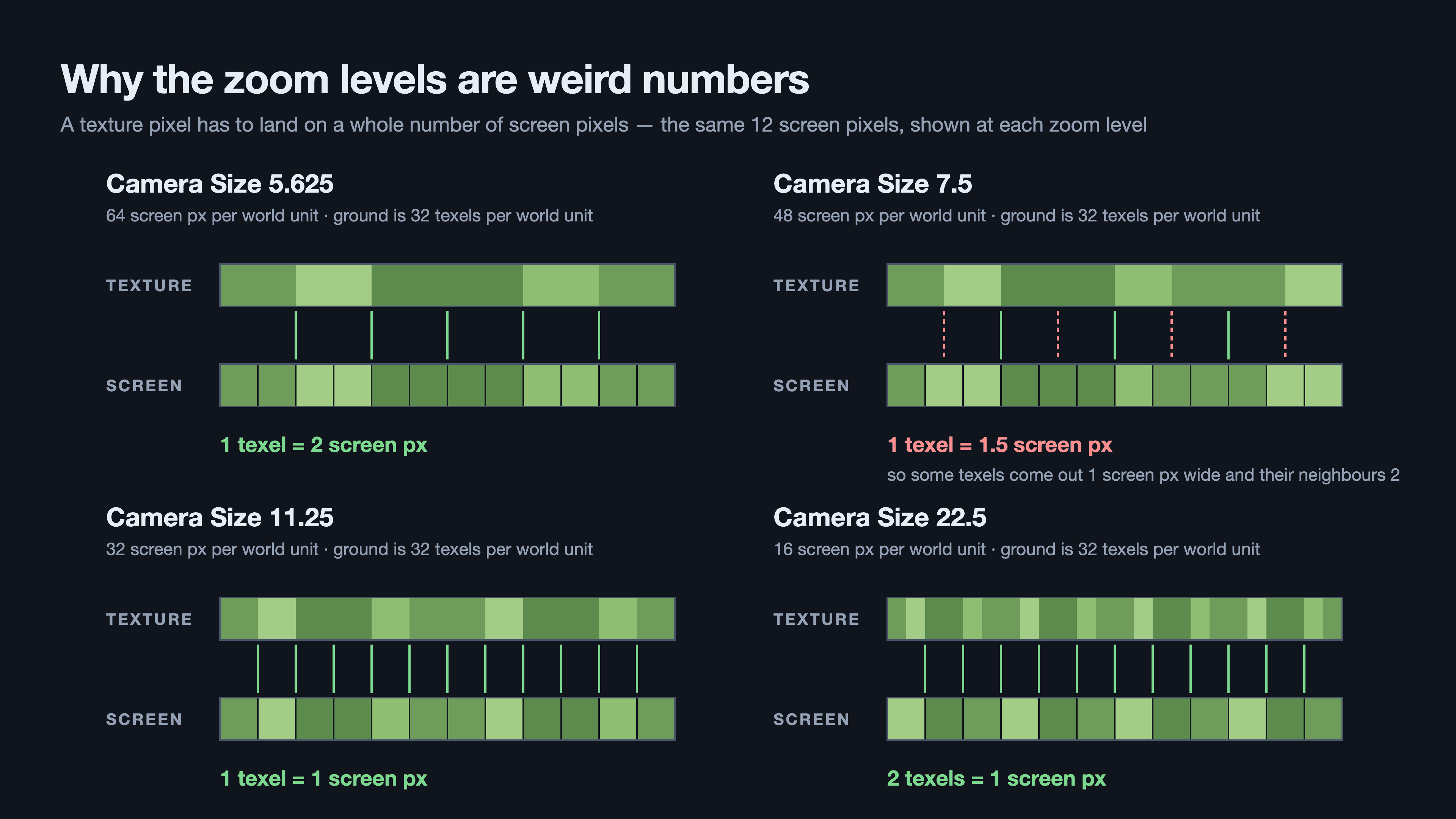
For pixel art, you want texture pixels and screen pixels to line up cleanly: each texture pixel covering exactly one or two screen pixels, or exactly two texture pixels per screen pixel when zoomed out. Three of the four levels do that for the map's ground texture. 7.5 doesn't: it gives 1.5 screen pixels per texture pixel, so some pixels come out one screen pixel wide and their neighbours two.
Zoom is also why the health bars are 3D geometry instead of 2D UI. Across a 4x zoom range, anything sized in screen pixels ends up either huge or tiny next to the characters.
Rule 1: Don't Let the Camera Go Flat While Picking a Cell
The camera can tilt all the way up to looking straight across the map. The flat view is intentional, almost like a side-on platformer, but it's a bad angle for choosing where to move: cells squash into thin strips, and the mouse ray skims along the ground instead of hitting it cleanly.
So while the player is choosing a cell to move to or attack, the camera can't be flatter than 25 degrees down. If it already is, it eases down to that limit.
// null means no extra limit
public float? PitchLimit { get; set; }

// More negative is steeper, so the tighter of the two limits wins
private float EffectiveMaxPitch =>
    PitchLimit.HasValue ? Mathf.Min(MaxPitch, PitchLimit.Value) : MaxPitch;

public override void _PhysicsProcess(double delta)
{
    if (PitchDegrees > EffectiveMaxPitch)
    {
        PitchDegrees = Mathf.MoveToward(PitchDegrees, EffectiveMaxPitch, PitchEaseSpeed * (float)delta);
        ApplyRotation();
        PitchChanged?.Invoke();
    }
}
My first idea was to tilt the camera back to where the player had it once they'd picked a cell. I dropped that. Moving the camera twice for every action felt busy, and it raised awkward questions: what if the player rotates mid-selection, cancels the move, or a cutscene starts? Now it's only a limit. When the limit lifts, the camera stays where it is.
The camera doesn't decide when the limit applies. A separate small node watches the current unit's state each frame and sets PitchLimit:
public override void _Process(double delta)
{
    var unit = battleManager.CurrentTurnUnit;
    var isPlayerPickingCell = unit is { Faction: Faction.Player } &&
                              unit.State is UnitState.PickingMoveCell or UnitState.PickingAttackCell;

    camera.PitchLimit = isPlayerPickingCell ? SelectionPitchLimit : null;
}
I've used this split for every rule in this post: the camera knows how to limit or move itself, and a separate node decides when. Each rule can be tuned in the editor or deleted as a whole without touching the camera code.
Rule 2: Nudge to a Readable Angle When a Unit Acts
This rule exists because of the sprites. My characters are drawn in four diagonal directions, and the game picks whichever drawn direction is closest to where the unit faces on screen.
At the angle the art was drawn for, 45 degrees, a unit facing along the grid lines up exactly with one of its diagonal sprites. As the camera turns away from 45, the closest sprite gets less and less accurate. At 0, 90, 180, and 270 degrees, the unit's facing sits exactly halfway between two sprites, and the choice between them is arbitrary. That's when an attack looks like a sideways swing.
My first version snapped the camera all the way back to the nearest isometric angle (45, 135, 225, or 315) whenever a unit got ready to move or attack. It worked, but it moved the camera up to 45 degrees for every action, which was more correction than the sprites needed. After trying different angles, 15 degrees off looked fine to me. So now the camera only nudges to within 15 degrees of an isometric angle:
private const float BaseYaw = 45f;
private const float MaxSpriteErrorDegrees = 15f;

// Returns one of 30/45/60, 120/135/150, 210/225/240 or 300/315/330
public static float NearestReadableYaw(float yawDegrees)
{
    var fromBase = yawDegrees - BaseYaw;

    // Which isometric angle are we closest to?
    var isometricIndex = Mathf.Round(fromBase / 90f);
    var offsetFromIsometric = fromBase - isometricIndex * 90f;

    // Snap that offset to -15, 0 or +15
    var snapped = Mathf.Round(offsetFromIsometric / MaxSpriteErrorDegrees) * MaxSpriteErrorDegrees;
    var allowed = Mathf.Clamp(snapped, -MaxSpriteErrorDegrees, MaxSpriteErrorDegrees);

    return BaseYaw + isometricIndex * 90f + allowed;
}
Two things about this have been useful:
- The bad angles can never be a target. The allowed angles come in clusters with 60-degree gaps between them, and 0, 90, 180, and 270 sit right in the middle of those gaps. A simpler "snap to every 15 degrees" would include 90 and 180, and aim the camera straight at the worst case.
- It always takes the short way around. The target is worked out from the current yaw, so it's never more than 30 degrees away, and the camera never spins the long way round.
The biggest correction is now 30 degrees instead of 45, and in most cases it's much smaller.
When the Nudge Happens
At first, the camera aligned while the player was choosing a cell. That kept the camera constrained for longer than it needed to be, so I moved the trigger to the moment a unit actually starts moving or attacking. Up until then, the camera is completely free.
That change had a nice side effect. The enemy AI never goes through the "choosing a cell" states that the player does, so the original version needed separate handling for AI turns. Every unit, player or AI, goes through the same "start moving" and "start attacking" calls, so one check covers everyone:
public override void _Process(double delta)
{
    var unit = battleManager.CurrentTurnUnit;
    var isActing = unit?.State is UnitState.Moving or UnitState.Attacking;

    // Set every frame, not only when the state changes, so the lock
    // lifts right away if the acting unit is removed mid-action
    camera.YawLocked = isActing;

    if (isActing && StateJustChanged(unit))
    {
        camera.YawAlignTarget = BattleCamera.NearestReadableYaw(camera.YawDegrees);
    }
}
While a unit is acting, the player can't orbit the camera. That keeps the player and the alignment from fighting over the camera. Tilting stays free, because it doesn't affect which sprite is shown.
As the camera eases to its target, it keeps raising YawChanged, so the sprites update smoothly on the way instead of popping at the end.
There's one known cost. The animation starts on the same frame the camera starts turning, so in the worst case about a sixth of a second of the animation plays at a less accurate angle before the camera arrives. Waiting for the camera before starting the action would fix it, but that would mean changing the timing of every action, and so far it hasn't stood out enough to change.
Rule 3: Glide to Whoever's Turn It Is
At the closer zoom levels, the camera's pivot never moved on its own, so a unit could take its whole turn off screen. Now the camera glides to the current unit at the start of its turn, when it starts choosing where to move or attack, and when it returns to the action menu after moving, so the camera follows the unit to where it landed.
My first glide eased in exponentially, moving a fixed fraction of the remaining distance each frame. It looked wrong in two ways:
- It felt like a lurch. An exponential ease does most of its movement in the first few frames, then crawls the rest of the way too slowly to notice. It read as a jump whose speed depended on distance.
- Sometimes it was instant. The first frames of a battle take much longer than normal while things load, the very first one about 0.15 seconds. A quarter-second glide got used up by one or two long frames, and the camera just teleported onto the first unit.
So I replaced it with a hand-written ease:
// No single frame can use more than this much of the glide,
// so a slow frame makes the glide take longer instead of skipping it
private const float MaxGlideStepSeconds = 1f / 30f;

public void GlideTo(Vector3 target)
{
    // Orthographic size is the view height, so this measures the move in screens, not world units
    var screens = pivot.GlobalPosition.DistanceTo(target) / Size;

    glideFrom = pivot.GlobalPosition;
    glideTo = target;
    glideDuration = Mathf.Clamp(screens * SecondsPerScreen, MinGlideSeconds, MaxGlideSeconds);
    glideElapsed = 0f;
    isGliding = true;
}

private void AdvanceGlide(double delta)
{
    glideElapsed += Mathf.Min((float)delta, MaxGlideStepSeconds);

    var t = Mathf.Clamp(glideElapsed / glideDuration, 0f, 1f);

    // Sine ease in-out: starts slow, speeds up, and settles gently
    var eased = 0.5f * (1f - Mathf.Cos(Mathf.Pi * t));
    pivot.GlobalPosition = glideFrom.Lerp(glideTo, eased);

    isGliding = t < 1f;
}
A few decisions in there:
- Duration comes from distance on screen, not in the world. The same world distance is a small nudge when zoomed out and several screens when zoomed in. Measuring in screens makes the glide feel consistent at every zoom level, and I clamp it between a quarter of a second and 0.8 seconds.
- Each frame's step is capped. This is the part a built-in
Tweencouldn't do for me. A tween hands a long frame's full time to the animation, so a hitch skips ahead. Capping the step means a hitch just makes the glide a little slower. The opening glide now takes 34 rendered frames instead of 2. - Panning cancels the glide. If the player moves the camera themselves, the glide stops, so it never fights them.
One bug came from how the states work. Cancelling a move puts the unit back on its original cell, but the camera didn't follow. The focus node was only reacting to state changes, and cancelling a move returns the unit to the "choosing an action" state it was already in, so there was no change to react to. Now it also glides when the point it's focused on moves.
Wrapping Up
Looking back, most of this camera is made of limits and nudges rather than hard control. The player can still point the camera almost anywhere, and it only steps in when it would otherwise make the game harder to read or play.
Keeping each rule in its own small node has been helpful. When something felt off in play, I could tune one number or switch one node off without untangling the others.
There's still plenty I'd like to improve. The 7.5 zoom level could use a size that lines up with whole pixels, and I'd like to see whether waiting for the camera to finish turning before an attack starts feels better or just slower. I'm sure I'll find more as the maps get bigger.