Rebuilding the Grid and Pathfinding for 3D Battles in My Tactics RPG
A few months ago I wrote about the grid-based movement system in my tactics RPG. That system doesn't exist anymore. Battles in my game are now 3D maps with 2D pixel-art characters standing on them, and the grid and pathfinding had to be rebuilt almost from scratch.
This post covers how the new grid works: reading it straight from the map's 3D mesh, replacing A* with a single breadth-first search, adding climb and drop limits, and letting units walk through their allies.
This is an early stage implementation that's working well for the battle maps I've built so far, but there's definitely room for improvement — particularly in terrain variety, movement costs, and how collision gets generated for the map.
Why I Moved Battles to 3D
When I started, I assumed a fully 2D game would be the easier path. For isometric battle scenes, it turned out to be the harder one.
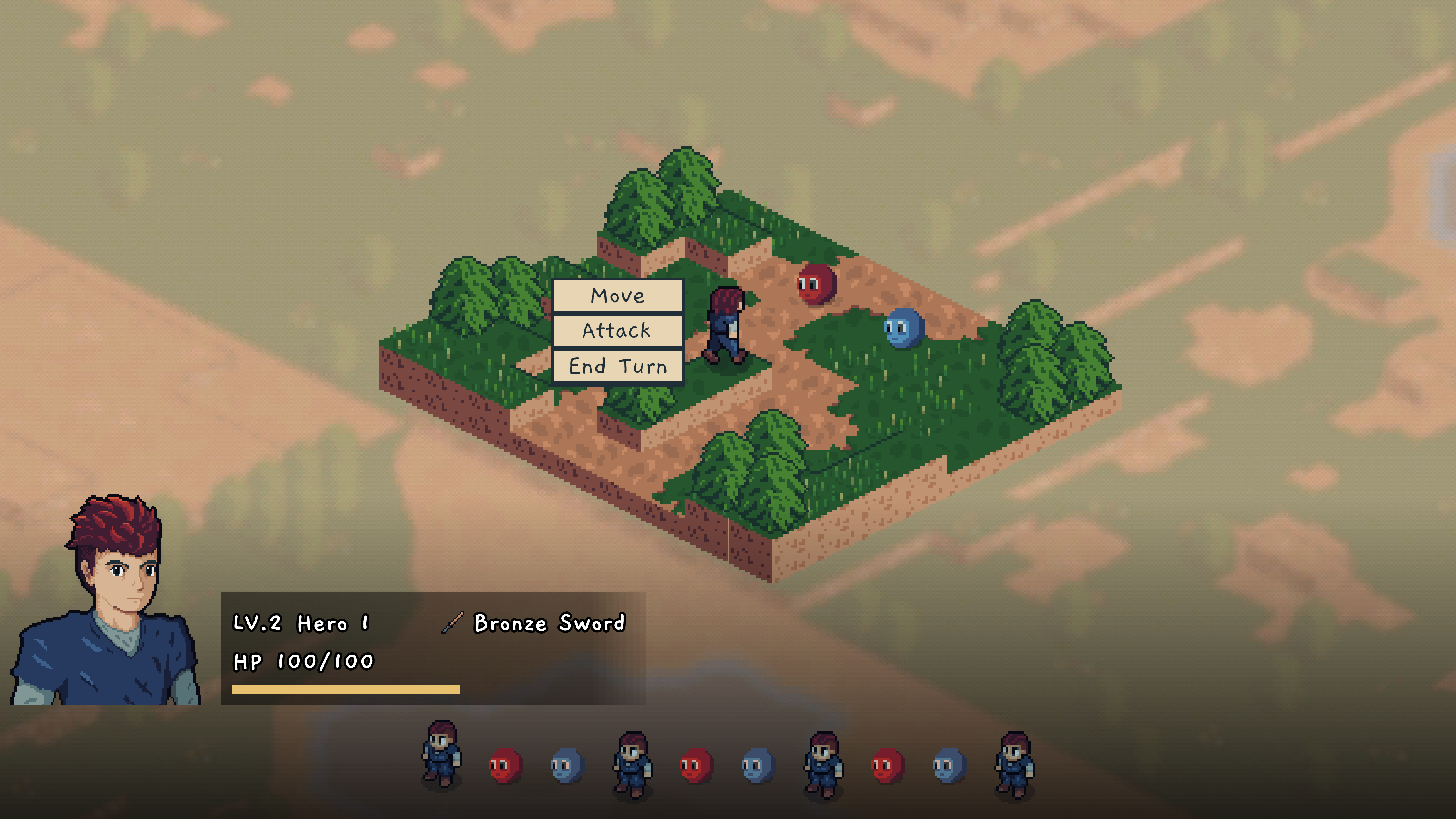
The map above is built from stacked tilemap layers, one per floor. Elevation doesn't really exist in a 2D tilemap, so everything that touches it had to be faked:
- Hover detection had to test each floor from the top down, shifting the mouse position by a pixel offset per floor to work out which one you were pointing at.
- Sprites needed hand-tuned vertical offsets so a unit on the second floor looked like it was standing on the second floor.
- Draw order (y-sorting) between units, trees, and ledges needed constant care.
Those were annoying, but they weren't what pushed me. What really pushed me was the camera. I wanted players to be able to rotate the view, and in pixel art that means drawing every battle map from four angles. Once I realized how much work that would be for every single map, 3D started to look like the easier option.
Now the maps are modelled in Blender with pixel-art textures, and the characters are still 2D sprites. The camera can rotate, and making a new map is mostly a modelling job instead of four drawing jobs.
What Stayed the Same
A lot of the rules survived the move, which made it much less scary:
- Cells are still integer
Vector2Icoordinates. - Units still move in four directions, with no diagonals.
- Attack range is still a Manhattan diamond that ignores obstacles, so ranged units can shoot over trees.
- Turn order, the battle event flow, and unit components only talk to the grid through coordinates, so they barely noticed the change.
What changed is everything underneath: where the grid comes from, how heights work, and how a path gets found.
The Grid Is Now Plain C#
In 2D, the grid was the tilemap. In 3D, the map is just a mesh, so I needed a separate logical grid laid over it. I looked at Godot's GridMap, but it's built around placing tile meshes, and my maps are freeform Blender models. A small custom grid ended up being simpler.
public class BattleCell
{
    public Vector2I Coord { get; }

    // The point a unit stands on, including the terrain height baked from the mesh
    public Vector3 WorldPosition { get; set; }
    public float Height => WorldPosition.Y;

    public bool Walkable { get; set; }
    public IGridOccupant? Occupant { get; set; }

    public bool IsFree => Walkable && Occupant == null;
}

public class BattleGrid
{
    private readonly Dictionary<Vector2I, BattleCell> cells = new();

    // Centre of cell (0,0), not its corner
    public Vector3 MapOrigin { get; }

    // Per map, since maps can be authored at different scales
    public float CellSize { get; }

    // World units per floor, so unit stats can be counted in floors
    public float HeightStep { get; }

    public Vector2I WorldToCell(Vector3 worldPosition)
    {
        var local = worldPosition - MapOrigin;
        return new Vector2I(
            Mathf.RoundToInt(local.X / CellSize),
            Mathf.RoundToInt(local.Z / CellSize));
    }
}
A few decisions baked into this that have been helpful:
One height per column. Grid X maps to world X and grid Y maps to world Z, and each (x, z) column has exactly one walkable height. That rules out bridges and tunnels, where a unit could stand both over and under the same spot. I don't need those for the maps I'm planning, and giving them up keeps the grid a flat dictionary instead of a layered 3D graph.
The origin is the centre of a cell. My first attempt sampled the mesh at cell corners. Corners land on tile bevels and the sides of tree trunks, and the grid came back claiming the map had 15 height levels when it actually had 3. Sampling at cell centres fixed it.
Occupants are an interface, not the unit node. A BattleUnit is a Godot node, and anything that references a node needs the engine running. Typing the occupant as an empty IGridOccupant interface keeps the whole grid free of Godot nodes, which matters a lot for testing (more on that below).
Reading the Map From the Mesh
The part I'm happiest with is that the 3D model is the level data. There's no separate walkability layer to paint. When a battle starts, the game reads the grid directly off the mesh.
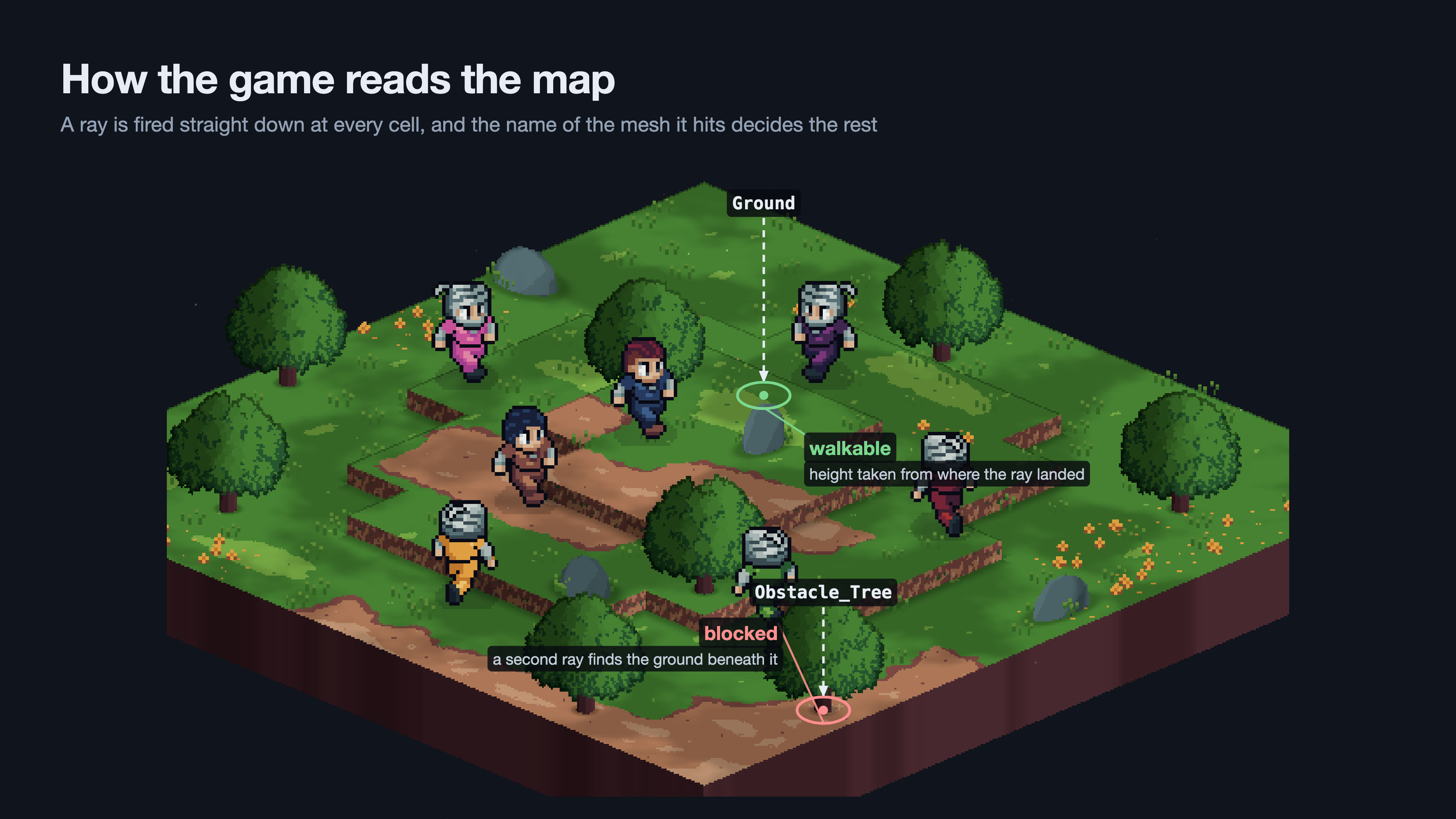
The process is:
- Generate collision for the map's meshes at runtime.
- Work out the grid's size from the bounds of the ground meshes.
- Fire a ray straight down at the centre of every cell.
- Look at the name of the mesh the ray hits.
That last step relies on a naming rule I follow in Blender:
| Mesh name starts with | Result |
|---|---|
Ground | Walkable. The cell's height is wherever the ray landed. |
Obstacle | Blocked. |
Decor | No collision at all, so rays pass straight through. |
| Anything else | Blocked. |
"Anything else is blocked" is on purpose. If I add a new prop and forget to name it, the worst case is a cell I can't walk on, which I'll notice right away. The opposite default would let units stand on top of rocks.
Decor exists for small things like flowers. Without it, a flower in the middle of a tile either blocks the whole cell or becomes the surface the unit stands on.
private BattleCell? SampleCell(BattleGrid grid, Vector2I coord)
{
    var flat = grid.CellToWorld(coord);
    var from = new Vector3(flat.X, rayTopY, flat.Z);
    var to = new Vector3(flat.X, rayBottomY, flat.Z);

    var hit = CastRay(from, to);
    if (hit == null)
    {
        return null; // No mesh under this cell, so it isn't part of the map
    }

    if (IsGroundMesh(hit.Collider))
    {
        return new BattleCell(coord, new Vector3(flat.X, hit.Position.Y, flat.Z));
    }

    // Cast again ignoring the obstacle, so a blocked cell still knows
    // the ground height underneath it. Guides and the camera use that height.
    var groundHit = CastRay(from, to, exclude: hit.Collider);
    var groundHeight = groundHit?.Position.Y ?? hit.Position.Y;

    return new BattleCell(coord, new Vector3(flat.X, groundHeight, flat.Z), walkable: false);
}
Two things caught me out here:
- Only ground meshes define the bounds. At first, bounds came from every mesh in the map. A tree canopy hanging over the edge widened the bounds, moved the origin, and quietly shifted every cell coordinate on the map. The play area should only depend on the ground.
- Runtime collision isn't ready immediately. Rays cast in the same frame the collision was created hit nothing. Waiting for one physics frame before baking fixed it.
Picking a Cell With the Mouse
This is where 3D made things simpler. In 2D, hovering meant walking the floor layers from the top down and nudging the mouse position by a per-floor pixel offset:
// Before: 2D, one tilemap layer per floor
for (var floor = topFloor; floor >= 0; floor--)
{
    var corrected = mousePosition + new Vector2(0, CELL_Y_OFFSET * floor);
    var cell = floorLayers[floor].LocalToMap(corrected);
    if (floorLayers[floor].HasTile(cell))
    {
        return cell;
    }
}
In 3D, the mouse becomes a ray from the camera. Wherever it hits the map, I convert that point to a cell:
// After: 3D
var from = camera.ProjectRayOrigin(mousePosition);
var to = from + camera.ProjectRayNormal(mousePosition) * RAY_LENGTH;

var hit = CastRay(from, to);
if (hit == null)
{
    return null;
}

var cell = grid.WorldToCell(hit.Position);
return grid.HasCell(cell) ? cell : null;
No floor loop and no magic offsets. The height is already in the hit position.
One related change: whether a click is a legal move now comes from the grid, not from the visuals. The 2D version checked whether a highlight tile had been painted on the hovered cell, which meant rendering decided gameplay. Now it asks the pathfinding result directly, and the highlights are purely cosmetic.
Pathfinding: From A* Per Cell to One Search
In the previous post I used Godot's AStarGrid2D. To find every cell a unit could reach, I ran a full A* path to each candidate cell in the movement diamond and kept the ones that fit in the unit's range. I listed that as something to improve, and the move to 3D forced the issue. AStarGrid2D wasn't a good fit anymore:
- It expects a solid rectangular region. My new grid is a dictionary, and cells can simply be missing where a ray didn't hit anything.
- It has no concept of height, so climbing rules would have needed a replacement anyway.
- It needs the engine running, which kept pathfinding out of my unit tests.
So I replaced it with a plain breadth-first search. A single search from the unit outward answers both questions at once: which cells can I reach, and what's the path to each one.
public static MoveField FindReachableCells(BattleGrid grid, Vector2I start, int maxSteps,
    ISet<Vector2I> blocked, float maxClimb, float maxDrop)
{
    var stepsTo = new Dictionary<Vector2I, int> { [start] = 0 };
    var cameFrom = new Dictionary<Vector2I, Vector2I>();
    var frontier = new Queue<Vector2I>();
    frontier.Enqueue(start);

    while (frontier.Count > 0)
    {
        var current = frontier.Dequeue();
        if (stepsTo[current] >= maxSteps)
        {
            continue;
        }

        foreach (var direction in FourDirections)
        {
            var next = current + direction;

            // Breadth-first visits cells in step order, so the first
            // time we reach a cell is already the shortest route to it
            if (stepsTo.ContainsKey(next) ||
                !grid.IsWalkable(next) ||
                blocked.Contains(next) ||
                !CanStep(grid, current, next, maxClimb, maxDrop))
            {
                continue;
            }

            stepsTo[next] = stepsTo[current] + 1;
            cameFrom[next] = current;
            frontier.Enqueue(next);
        }
    }

    return new MoveField(start, stepsTo, cameFrom);
}
The result is a MoveField. Every cell in stepsTo is reachable, and cameFrom records which cell each one was reached from. Getting a path is just following those links backwards:
public Vector2I[] PathTo(Vector2I target)
{
    if (!CanReach(target))
    {
        return [];
    }

    var path = new List<Vector2I> { target };
    var current = target;

    while (current != Start)
    {
        current = cameFrom[current];
        path.Add(current);
    }

    path.Reverse();
    return path.ToArray();
}
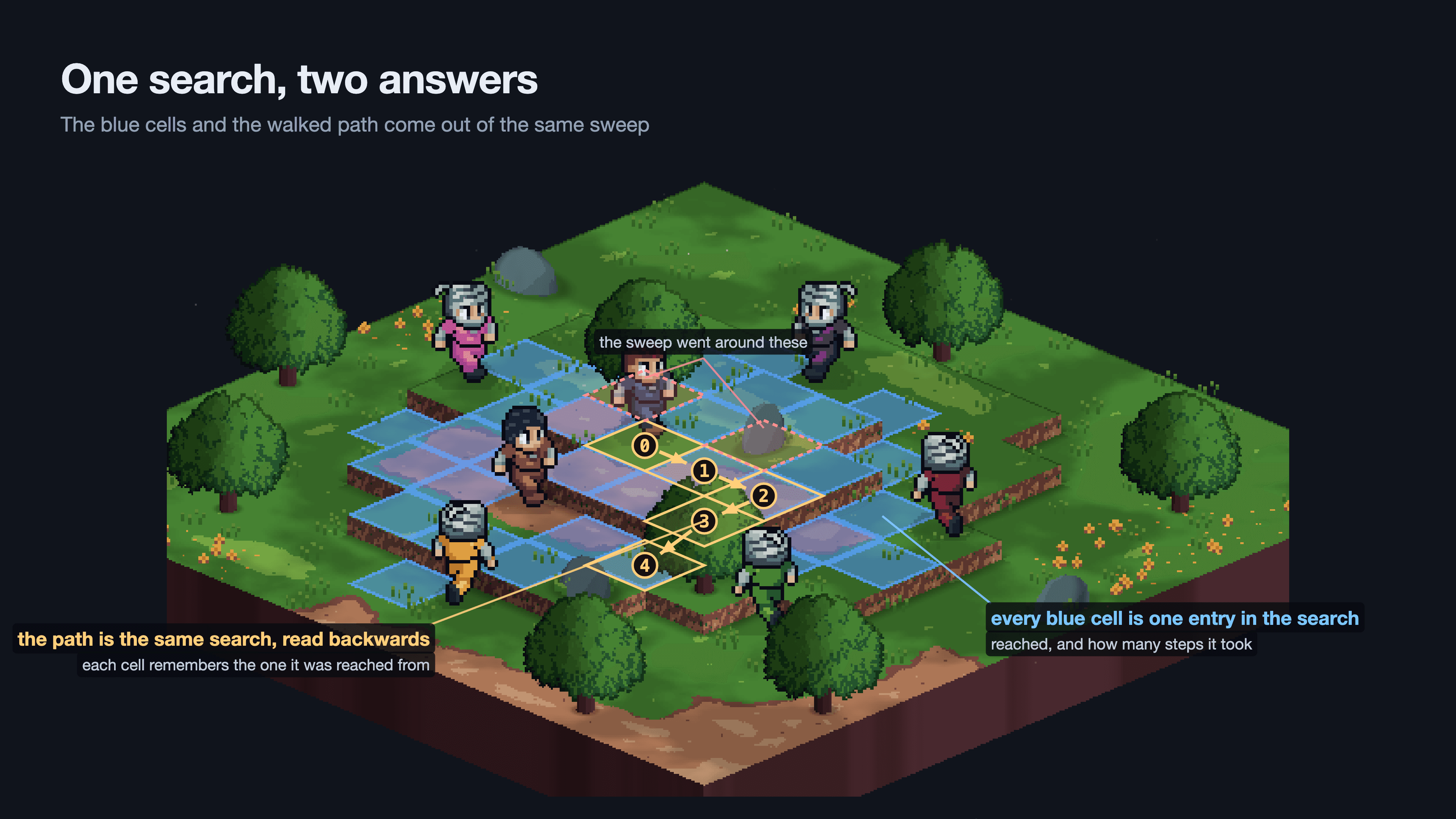
I calculate a unit's MoveField once when its turn starts and keep it until it acts. Hovering over cells, drawing the highlights, validating a click, and animating the walk all read from that one result. The enemy AI uses the same MoveField too, so it gets every movement rule for free without running its own search.
It does mean I own about 60 lines of pathfinding that the engine used to provide. On maps this size, that's been a good trade.
Climbing and Dropping
With real heights on every cell, I could finally add elevation rules. Each step in the search checks the height difference between the two cells:
// Raycast heights land a tiny bit off their authored values
private const float HEIGHT_TOLERANCE = 0.001f;

private static bool CanStep(BattleGrid grid, Vector2I from, Vector2I to,
    float maxClimb, float maxDrop)
{
    var rise = grid.GetCell(to).Height - grid.GetCell(from).Height;

    // Climbing and dropping are limited separately, so a ledge can be one-way
    return rise >= 0
        ? rise <= maxClimb + HEIGHT_TOLERANCE
        : -rise <= maxDrop + HEIGHT_TOLERANCE;
}
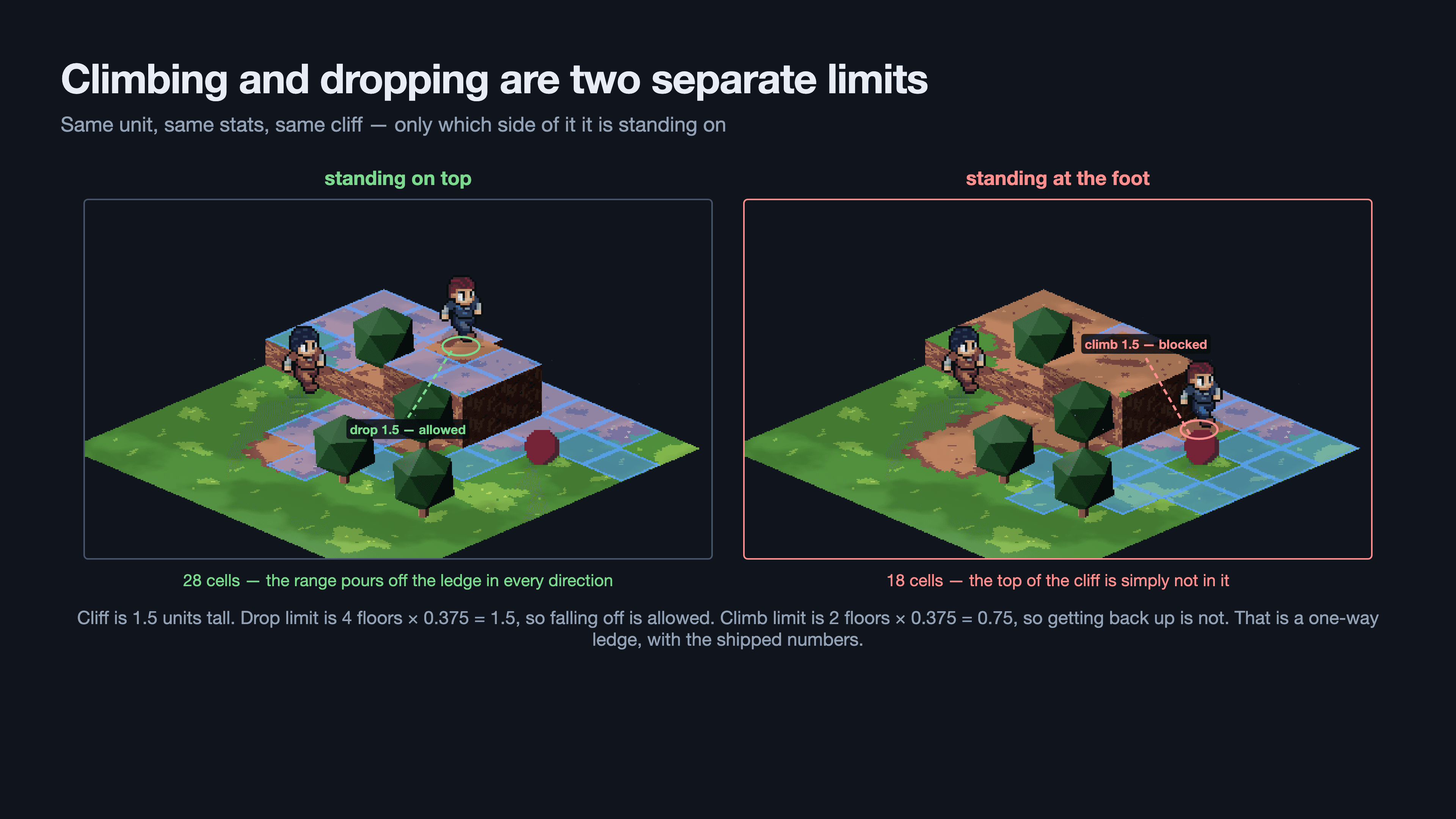
Keeping climb and drop as separate limits gives me one-way ledges for free. A unit can jump down a tall cliff but can't climb back up it.
The limits are stats on each unit, and they're counted in floors, not world units:
var field = BattlePathfinder.FindReachableCells(grid, unit.Coord,
    unit.Attributes.MovementRange,
    BlockedCells(grid),
    maxClimb: unit.Attributes.ClimbFloors * grid.HeightStep,
    maxDrop: unit.Attributes.DropFloors * grid.HeightStep);
By default a unit can climb 2 floors and drop 4. With a floor height of 0.375 world units, that's a 0.75 climb limit and a 1.5 drop limit.
I went with floors because maps don't all have to be built at the same scale. A climb stat in world units would silently break the first time a map used a different floor height. Counted in floors, changing a map's floor spacing is a single value on that map, and no unit stats need touching. It also reads better on a stat screen: "Climb: 2" means two floors.
The tolerance is there because baked heights come from raycasts and land a hair off their authored values. Without it, a step that's exactly at the limit can be wrongly rejected.
Walking Through Allies
The 2D version let units walk through their own teammates. The first 3D version lost that: every occupied cell went into the blocked set, so paths took long detours around your own party. Enemy AI suffered too, lining up single file in corridors.
The fix relies on splitting two questions that are easy to mix up:
- Can I pass through this cell? Decided during the search.
- Can I stop on this cell? Checked separately wherever a destination gets picked.
// Only hostile units stop the search. Friendly units are walked through,
// and the IsFree check below keeps them from being picked as a destination.
private HashSet<Vector2I> BlockedCells(BattleGrid grid)
{
    return grid.OccupiedCoords()
        .Where(coord => grid.GetOccupant(coord) is BattleUnit other &&
                        !other.Faction.IsFriendlyTo(unit.Faction))
        .ToHashSet();
}

private bool CanMoveTo(Vector2I cell)
{
    return moveField.CanReach(cell) && grid.GetCell(cell).IsFree;
}
Every place that picks a destination was already checking IsFree: the move highlights, the player's click, and the AI's choice of where to go. So the whole change came down to what goes into blocked. Keeping "can I get there" and "can I stop there" in separate places has been helpful, and I want to protect that split as movement rules grow.
For passing through, players and allies are on the same side, enemies are on another, and neutral units are on their own. Neutral units get their own side so they don't become a free corridor for either army in the middle of a fight.
This is also deliberately not the same rule as who you can attack. Walking past someone and being able to hit them are different questions, and I expect them to diverge once neutral units actually do something. The faction check also stays out of the grid's IGridOccupant interface, because the grid shouldn't need to know what a faction is.
Testing Without the Engine
Keeping the grid, the cells, and the pathfinder free of Godot nodes means I can test them in a plain C# test project that never starts the engine. The whole suite runs in milliseconds.
[Fact]
public void ALedgeIsOneWayWhenDropExceedsClimb()
{
    // A two-floor plateau next to flat ground
    var grid = SteppedGrid();

    var goingDown = BattlePathfinder.FindReachableCells(grid, new Vector2I(3, 1), 1,
        noBlockers, maxClimb: OneFloor, maxDrop: 2 * OneFloor);
    var goingUp = BattlePathfinder.FindReachableCells(grid, new Vector2I(3, 0), 1,
        noBlockers, maxClimb: OneFloor, maxDrop: 2 * OneFloor);

    Assert.True(goingDown.CanReach(new Vector2I(3, 0)));
    Assert.False(goingUp.CanReach(new Vector2I(3, 1)));
}
This turned out to be one of the most useful parts of the rebuild. Pathfinding bugs are hard to spot by clicking around a map, but easy to pin down with a tiny hand-built grid. It's also the concrete reason I moved off AStarGrid2D: it can't even be created outside a running Godot process, so it could never be tested this way.
Known Limitations
A few things I've left out on purpose for now:
- Climbing doesn't cost extra movement. Every step costs 1, which is what keeps this a simple breadth-first search. Weighted costs for climbing or rough terrain would turn it into Dijkstra's algorithm, and that's a game balance question I haven't answered yet.
- Attack range ignores height. Standing on high ground doesn't extend your reach yet.
- No ramps, bridges, or overlapping floors. Only one walkable height per column, and sloped ground can only be decoration for now.
- Collision is generated when the battle loads. It works and needs nothing extra from the art side, but generating collision when the model is imported would be cleaner and more standard. It's on my list.
Wrapping Up
Looking back, the move to 3D was really worth it. The grid is simpler than the 2D one, pathfinding is one search instead of dozens, elevation is real data instead of pixel offsets, and making a new battle map is now mostly a Blender job.
I'm sure there are things here I'll rethink as the maps get bigger and the terrain gets more varied. Next, I'd like to write about the other half of the rebuild: keeping 2D pixel-art sprites looking right in a 3D world with a rotating camera.