Building a Grid-Based Movement System for a Tactics RPG
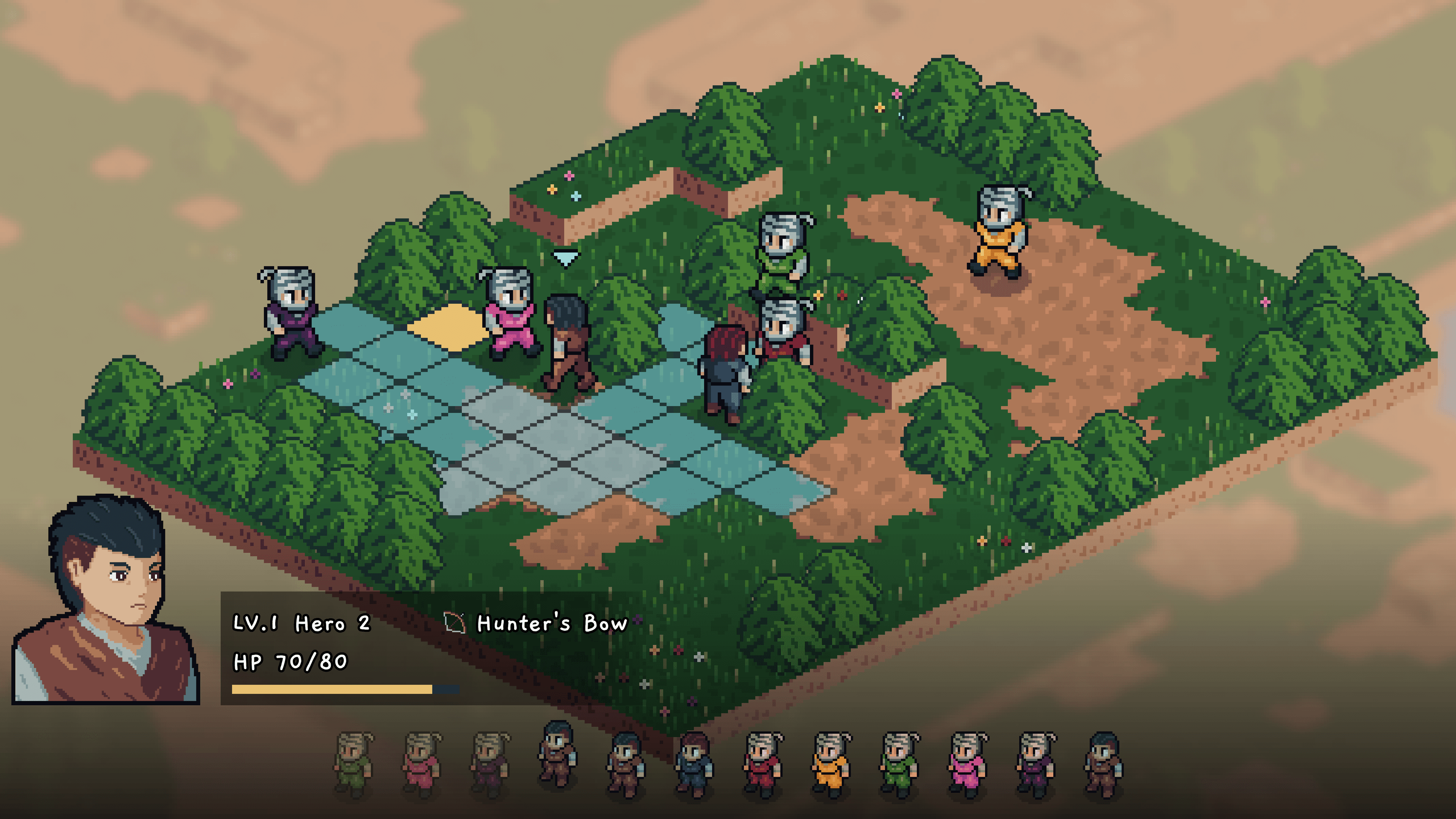
The grid is where almost every tactical decision in my game gets made — where a unit can move to, who's in attack range from there, which cells are blocked by walls or by another unit. It's also the part of the game that has the most subtle gotchas: off-by-one path lengths, isometric sprite offsets, and a hover-detection pass that has to know which floor you're pointing at when two floors overlap visually.
This is an early stage implementation that's working well for the battles I've built so far, but there's plenty of room for improvement — particularly in terrain variety, support for non-walking movement types, and pathfinding cost as encounters get larger.
The Cast of Characters
After a few refactor passes, the movement system splits across three classes:
BattleMapLayers— the grid itself. Multi-floor tilemap, A* pathfinding, range calculation, visual move/attack guides.BattleMap— input handling. Polls hover and click, decides which action to dispatch based on the current unit's state.BattleUnitMover— a per-unit component that owns the actual movement animation (tween path, sprite offset, direction). One perBattleUnit.
A lot of the earlier version of this system lived on BattleUnit itself. I pulled the movement code out into BattleUnitMover when I refactored battle units into a composition shape — it sits a lot cleaner there, and the host BattleUnit no longer cares how movement happens.
The Map: Multi-Floor Tilemap
BattleMapLayers owns the grid representation. The map is built from separate TileMapLayer exports — three floor layers (first / second / third), plus dedicated layers for move guides, action guides, and static obstacles like trees.
[Export] private TileMapLayer _firstFloorLayer;
[Export] private TileMapLayer _secondFloorLayer;
[Export] private TileMapLayer _thirdFloorLayer;
[Export] private TileMapLayer _moveGuideLayer;
[Export] private TileMapLayer _actionGuideLayer;
[Export] private TileMapLayer _objectsLayer;

private TileMapLayer[] TopToBottomFloorLayers =>
    [_firstFloorLayer, _secondFloorLayer, _thirdFloorLayer];

public enum FloorLevel
{
    FirstFloor = 0,
    SecondFloor = 1,
    ThirdFloor = 2,
}
The three floors aren't just for looks — units on a higher floor get height advantages in combat, and bridges or platforms can pass over other tiles. The interesting part is hover detection. When the player points at a spot on screen, I need to know which floor they're aiming at, because two floors might visually overlap.
private const float CELL_Y_OFFSET = 8;

public Vector2I? GetHoveredCell()
{
    var pointerPosition = GetGlobalMousePosition();

    // Walk floors top-down. Higher floors visually sit above lower floors,
    // so we ask the highest floor first whether the pointer is over a tile.
    for (var i = TopToBottomFloorLayers.Length - 1; i >= 0; i--)
    {
        var correctedPosition = pointerPosition + new Vector2(0, CELL_Y_OFFSET * i);
        if (TopToBottomFloorLayers[i].LocalToMap(correctedPosition) is { } cell &&
            TopToBottomFloorLayers[i].GetCellSourceId(cell) != -1)
        {
            return cell;
        }
    }
    return null;
}
The CELL_Y_OFFSET * i correction is what lets a click on a bridge tile return the bridge cell, not the floor underneath. Flip the loop direction and the lower floors become unclickable in any spot where a higher floor overlaps them.
Coordinates
Cells are Vector2I — integer grid coordinates. The map exposes the standard helpers:
public Vector2I LocalToMap(Vector2 position) =>
    _moveGuideLayer.LocalToMap(position);

public Vector2 MapToLocal(Vector2I cell) =>
    _moveGuideLayer.MapToLocal(cell);
I pin all coordinate conversions to the move guide layer so there's one canonical coordinate space — the floor layers and the guide layers all line up.
The visual rendering is isometric, but from the C# side the grid is just integers. The only place the isometry leaks in is the CELL_Y_OFFSET corrections in hover detection and the sprite offset adjustments described later.
Movement Range: A Manhattan Diamond
A unit's reachable cells form a diamond — Manhattan distance — equal to its MovementRange stat. Building that diamond by hand:
private Vector2I[] GetCellsWithinRange(Vector2I currentCell, int range)
{
    var cells = new List<Vector2I>();

    for (var i = 1; i <= range; i++)
    {
        // Cardinals at distance i
        cells.Add(currentCell + new Vector2I( i, 0));
        cells.Add(currentCell + new Vector2I(-i, 0));
        cells.Add(currentCell + new Vector2I(0,  i));
        cells.Add(currentCell + new Vector2I(0, -i));

        // Fill in the diamond's edges
        for (var j = i - 1; j > 0; j--)
        {
            cells.Add(currentCell + new Vector2I( i, 0) + new Vector2I(-j,  j));
            cells.Add(currentCell + new Vector2I(-i, 0) + new Vector2I( j, -j));
            cells.Add(currentCell + new Vector2I( i, 0) + new Vector2I(-j, -j));
            cells.Add(currentCell + new Vector2I(-i, 0) + new Vector2I( j,  j));
        }
    }

    return FilterCellsWithinMap(cells.ToArray());
}
For range 2, that produces:
      X
    X O X
  X O U O X
    X O X
      X
No diagonals — moving one cell up and one cell right counts as two steps, not one. That matches the pathfinder's behavior, which is the next piece.
Pathfinding: A* With No Diagonals
I use Godot's AStarGrid2D for pathfinding. The setup is straightforward — pin the region to the map bounds and turn off diagonal moves:
private AStarGrid2D CreateBattleMapAStarGrid()
{
    var aStarGrid = new AStarGrid2D();
    var origin = LocalToMap(_mapOriginCell.Position);
    var size   = LocalToMap(_mapEndCell.Position) - origin;

    aStarGrid.Region = new Rect2I(origin, size);
    aStarGrid.CellSize = TileSize;
    aStarGrid.DiagonalMode = AStarGrid2D.DiagonalModeEnum.Never;
    aStarGrid.Update();
    return aStarGrid;
}

public Vector2I[] GetUnitMovePath(BattleUnit unit, Vector2I targetCell)
{
    var aStarGrid = CreateBattleMapAStarGrid();

    foreach (var cell in ObstacleCells)
    {
        aStarGrid.SetPointSolid(cell);
    }

    return aStarGrid.GetIdPath(LocalToMap(unit.Position), targetCell).ToArray();
}
DiagonalMode.Never matters here — it has to match the Manhattan diamond above. If the range function produced cells that included diagonals but A* refused to step diagonally, you'd get cells lit up in the move guide that produce empty paths when clicked.
Obstacles vs. Occupied Cells
There's a small but important distinction:
// Every active unit's cell — used to suppress the move guide on top of units
public Vector2I[] OccupiedCells =>
    _battleManager.BattleUnits
        .Select(unit => LocalToMap(unit.Position))
        .ToArray();

// Cells that block pathfinding for the CURRENT turn unit
public Vector2I[] ObstacleCells =>
    _battleManager.BattleUnits
        .Where(unit => _battleManager.CurrentTurnUnit.Faction != unit.Faction)
        .Select(unit => LocalToMap(unit.Position))
        .Concat(GetObstacleCells()) // trees, walls, etc.
        .ToArray();
The rule:
OccupiedCellsis every unit, regardless of side. Used to keep the visual move guide from rendering on top of an existing unit.ObstacleCellsis only opposing units plus static obstacles. Same-faction units are passable — you can walk through an ally to reach a cell behind them, but you can't land on them. The opposing side is harder: enemy units block both the path and the destination.
Note: ObstacleCells is computed relative to whoever has the current turn. That's safe today because I only ever query paths for the active unit, but it's something to remember if I ever add AI lookahead or threat maps for non-active units.
Putting Range and Pathfinding Together
The reachable set isn't just the diamond. A cell might be inside the diamond but unreachable because something is blocking the only route to it. So GetUnitMoveCells does the full pathfinding pass for each candidate cell and trims:
public Vector2I[] GetUnitMoveCells(BattleUnit unit)
{
    var aStarGrid = CreateBattleMapAStarGrid();
    var available = new List<Vector2I>();
    var candidates = GetCellsWithinMoveRange(unit);

    foreach (var cell in ObstacleCells)
    {
        aStarGrid.SetPointSolid(cell);
    }

    foreach (var cell in candidates)
    {
        // MovementRange + 1 because the start cell counts toward the slice
        var movementLimit = unit.Attributes.MovementRange + 1;
        var path = aStarGrid
            .GetIdPath(LocalToMap(unit.Position), cell)[..movementLimit];

        foreach (var pathCell in path)
        {
            if (!available.Contains(pathCell))
            {
                available.Add(pathCell);
            }
        }
    }

    return available.ToArray();
}
The [..movementLimit] slice is the part that has bitten me more than once. The start cell counts toward the slice but doesn't count as a step, so you have to add 1. Forget that, and units come up one cell short of where they should be able to reach.
Visually:
Range = 3, with an obstacle:

[X] obstacle    [O] reachable    [.] inside diamond, unreachable

      O
    O O X
  O O U X .
    O O X
      O
The dotted cell is inside the diamond, but there's no path of length ≤ 3 to it — A* has to walk around the obstacle, and that walk is longer than the unit's movement range. So it doesn't make the cut.
The Movement Flow
Earlier versions of this system routed every step through the battle's event bus. After the composition refactor, the flow is much shorter — direct calls into per-unit components, with the per-unit signal machine carrying the lifecycle.
Input lives in BattleMap._Process. It polls hover every frame and only does anything if the current unit is player-controlled and the battle is in a state that accepts input:
public override void _Process(double delta)
{
    var hoveredCell = _battleMapLayers.GetHoveredCell();
    var isAutoTurn = _battleManager.CurrentTurnUnit.Faction != BattleUnitFaction.Player;

    if (!hoveredCell.HasValue || isAutoTurn ||
        _battleManager.BattleState is BattleState.Cutscene or BattleState.Finished
                                    or BattleState.Planning)
    {
        return;
    }

    HandleHoverOnCell(hoveredCell.Value);

    if (Input.IsActionJustPressed("mouse_left_click"))
    {
        HandleActionOnCell(hoveredCell.Value);
    }
}

private void HandleActionOnCell(Vector2I cell)
{
    switch (CurrentUnit.State)
    {
        case BattleUnitState.PreMove when _battleMapLayers.HasHoveredMoveGuideCell:
        {
            var path = _battleMapLayers.GetUnitMovePath(CurrentUnit, cell);
            CurrentUnit.Mover.StartMoving(path);
            break;
        }
        case BattleUnitState.PreAttack when _battleMapLayers.HasHoveredActionGuideCell:
        {
            var target = GetBattleUnitOnCell(cell);
            CurrentUnit.Attacker.StartAttacking(target);
            break;
        }
    }
}
Notice the dispatch branches on the unit's state, not on a global battle state. The host BattleUnit exposes a small per-unit state machine — ActionSelection / PreMove / Moving / PreAttack / Attacking / Waiting — that lives in signals, not in the bus.
When StartMoving runs:
- The mover emits
Movingon its host. The action menu (subscribed to that signal) hides itself. - A tween animates the unit cell by cell along the path. Sprite offset and facing direction are updated in parallel.
- When the tween finishes, the mover sets
HadMoved = true, hides the move guide, and emitsActionSelectionagain — the action menu reopens, this time with a "Cancel Move" option.
No bus events anywhere in that loop. The only cross-unit thing the bus carries during a turn is cutscene gating.
Multi-Floor Visual Adjustments
The thing I had the hardest time getting right was making units on stacked floors look like they were on the floor, not floating above it or sinking into it. Two adjustments do it:
public Vector2? GetCellPositionAdjustment(Vector2I cell)
{
    for (var i = TopToBottomFloorLayers.Length - 1; i >= 0; i--)
    {
        if (TopToBottomFloorLayers[i].GetCellSourceId(cell) != -1)
        {
            return new Vector2(0, CELL_Y_OFFSET * i);
        }
    }
    return null;
}

public Vector2? GetCellOffsetAdjustment(Vector2I cell, int battleUnitFloorOffset)
{
    for (var i = TopToBottomFloorLayers.Length - 1; i >= 0; i--)
    {
        if (TopToBottomFloorLayers[i].GetCellSourceId(cell) != -1)
        {
            return new Vector2(0, battleUnitFloorOffset - CELL_Y_OFFSET * 2 * i);
        }
    }
    return null;
}
They look almost identical but they do different things:
GetCellPositionAdjustmentadjusts the sprite's position node by 8 px per floor index. This shifts the whole sprite down so its transform origin lines up with the visually higher floor tile.GetCellOffsetAdjustmentadjusts the AnimatedSprite2D's internal Offset by twice that per floor index, baked together with a per-unitFloorOffsetvalue (taller units need more correction). This is what plants the unit's feet on the floor.
The mover tweens both during movement so transitions between floors animate smoothly. BattleMapPreview applies them statically in the editor so unit placement previews match runtime exactly.
Swap which one you use, and tall units will sink into the floor on certain levels. Don't ask how I found that out.
A Few Gotchas Worth Naming
- The path slice's off-by-one.
movementLimit = MovementRange + 1because the start cell counts toward the slice. I've forgotten the+1twice. Both times it surfaced as "the unit's reachable range looks one cell shorter than the diamond". - Hover detection order matters. Iterate floors bottom-up instead of top-down and any tile under a higher floor becomes unclickable. The
CELL_Y_OFFSET * icorrection also has to scale with the floor index, not be a fixed value. - Match the range function to the pathfinder. A Manhattan diamond goes with
DiagonalMode.Never. If the diamond produces cells A* can't reach by stepping cardinally, you get lit-up guide tiles that resolve to empty paths.
What's Still Rough
A few things I'd like to revisit:
- Terrain cost. Right now every walkable cell costs the same to enter. A terrain-cost system (mud, ice, water tiles) would let me design more interesting maps without changing unit stats.
- Movement variety. Everything walks. Flying units that ignore ground obstacles, teleport abilities, and position-swap moves are all in scope but not in yet.
- Pathfinding cost at scale.
GetUnitMoveCellsruns A* once per candidate cell, then again for the chosen one. Cheap at 4-on-4, but a 12-unit skirmish would feel it. Caching the reachable set per turn until the unit moves would be a clean optimization.
Wrap-up
Two ideas anchor the whole system: the diamond + path-truncation trick for figuring out where a unit can actually move to, and the per-unit signal machine for everything that happens during a move. The first is mostly math. The second is the part that took the most refactoring to get right — pulling movement off the unit class and into a small component that subscribes to its own host's signals.
If you're building something similar, my one bit of advice is to keep the range function and the pathfinder honest with each other from the start. Most of the weird bugs I've hit haven't been in either piece — they've been at the seam where one says "you can reach this" and the other says "but not in that many steps".